
Portrait Enhancer
Our tool allows you to restore, enhance, or change the background of a photo of your choice
What is the Portrait Enhancer?
The Portrait Enhancer is a tool that improves the profile image on a memorial page. It can restore a photo by reducing blur, noise, and other distortions to improve clarity, lighting, and detail. It can also replace the photo's background with a new one. You can use either option on its own or both together.
What is the Portrait Enhancer?
The Portrait Enhancer is a tool that improves the profile image on a memorial page. It can restore a photo by reducing blur, noise, and other distortions to improve clarity, lighting, and detail. It can also replace the photo's background with a new one. You can use either option on its own or both together.
Who can use the Portrait Enhancer?
Memorial Keepers, the people who manage the memorial, can use the Portrait Enhancer. Visitors and guests viewing the memorial don't see the enhancement options.
Is the Portrait Enhancer included with my account?
The Portrait Enhancer is an add-on available on both free and Plus accounts. It's a one-time purchase of $10 USD per memorial.
How do I get started?
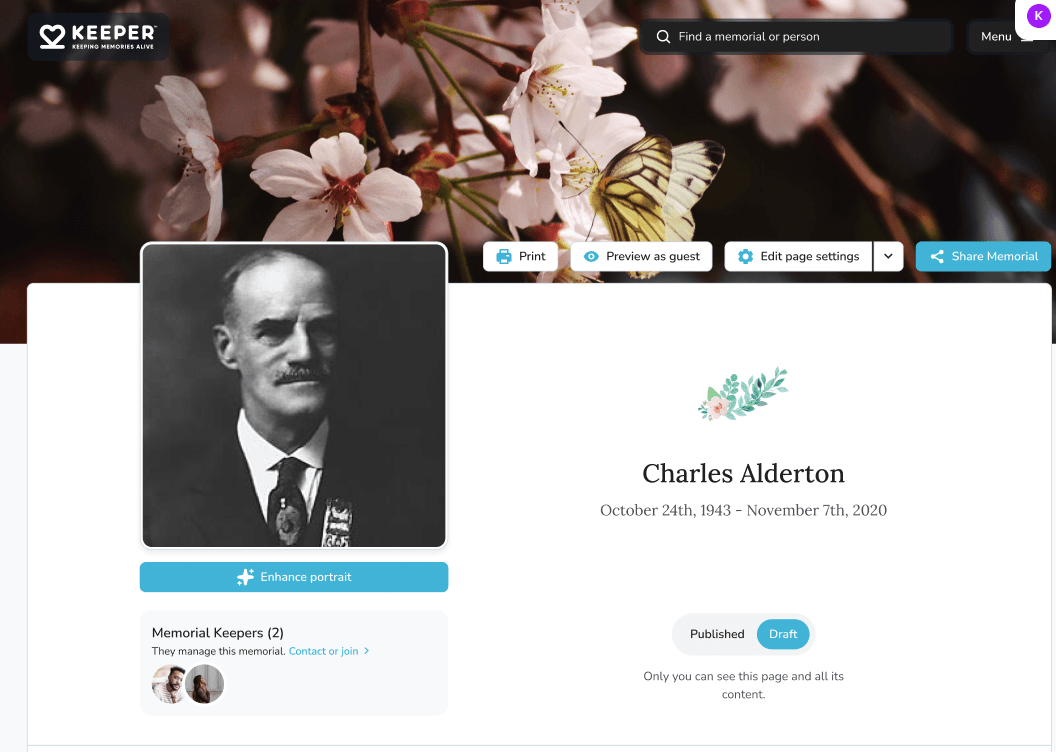
You can open the Portrait Enhancer in two ways: From the Memorial page: Select Enhance portrait, below the memorial portrait. From Memorial Settings: Open Edit page settings, go to the Details tab, and select Enhance portrait in the Memorial portrait section.

Both options open the same enhancement tool.
I don't see the Enhance portrait button. Why?
The button appears once a photo has been uploaded as the memorial portrait. If the memorial is still showing a placeholder or default image, select Upload a photo to add a portrait first. After it's uploaded, the Enhance portrait button will appear below it.

What enhancement options are available?
There are two options: Restore & enhance improves clarity, lighting, and detail. When it's turned on, you can choose a color style: Black & white, Sepia, or Color. Choosing a new background replaces the current background with one you choose, such as Memorial stars, Soft blue, or Warm glow.

Can I see the result before I pay?
Yes. As soon as you select an option, the portrait switches to a side-by-side preview. Drag the slider to compare the original photo with the enhanced version. You can try different combinations of options before deciding.

Will every photo look the same after enhancement?
Results vary based on the quality of the original photo. The preview shows how your portrait will look before you purchase.
How do I purchase the enhanced portrait?
Once you're happy with the preview, select Use enhanced portrait — $10.00. You'll go to a secure checkout page to complete your payment. After your payment is complete, you'll see a confirmation page. Select View New Portrait to return to your memorial.

What happens after I purchase?
Your enhanced portrait becomes the memorial portrait and is also saved to Mementos. The portrait displays an AI Enhanced badge.

Can I change my enhancements after purchasing?
Yes. Select Adjust enhancements below the portrait, either on the memorial page or in Memorial Settings. You can change the color style or background and select Save changes. There's no additional charge. Your purchase covers future updates to the portrait for that memorial.
Can I enhance a different photo on the same memorial?
Yes. If you replace the memorial portrait with a new photo, you can use the Portrait Enhancer on the new photo at no additional cost.
Does my purchase apply to my other memorials?
No. Each purchase applies only to the memorial it was bought for. To enhance a portrait on another memorial, you'll need a separate purchase for that memorial.
Who do I contact if I have a problem with my purchase?
Select Contact Support on the order confirmation page, or reach out to our support team: support@mykeeper.com - and we'll be happy to help.
Gérer la page mémorial | Aperçu des paramètres de profil
Utilisez Modifier les paramètres de la page pour mettre à jour les éléments de base, le design, la confidentialité et les administrateurs gardiens du mémorial.
Comment voir à quoi ressemble ma page mémorial pour les autres?
Utilisez Prévisualiser en tant qu'invité pour ouvrir le mémorial dans un nouvel onglet et le voir du point de vue d'un visiteur.